

Apache Kafka is more than a message queue—it’s a distributed log built for fault tolerance and scale. Understanding how it works under the hood is essential for designing an effective migration strategy.
Kafka is a publish/subscribe messaging system designed to handle generic data. Unlike traditional queue mechanisms, Kafka can be thought of as a distributed commit log. It provides a durable, ordered record of all transactions, allowing messages to be replayed to consistently build the state of a system. Additionally, data can be distributed within the system to provide fault tolerance and significant opportunities for scaling.
The fundamental unit of data in Kafka is the message. A message is simply an array of bytes, so Kafka itself does not impose any format or meaning. A message may also include optional metadata, such as a key, which ensures that all messages sharing that key are written to the same partition—as long as the partition count remains unchanged.
Messages in Kafka are organized into topics. Each topic is further divided into multiple partitions, which are the core mechanisms for achieving scalability and redundancy. Messages are appended to topics in a strictly ordered fashion and consumed in sequence, from beginning to end. While Kafka guarantees message order within a partition, this ordering does not extend across all partitions in a topic.
Kafka has two primary types of clients: producers and consumers.
- Producers create new messages and are responsible for distributing them evenly across a topic’s partitions. When a message has a key, the producer hashes the key to determine its target partition—ensuring that all related messages land in the same place.
- Consumers subscribe to one or more topics and read messages in the order they were written to each partition. Consumers track their progress using offsets—ever-increasing integers Kafka assigns to each message. By storing these offsets, typically in Kafka’s internal topics, consumers can stop and resume processing without losing their place.
Consumers belong to consumer groups, which can contain multiple consumers working together to process messages from a topic. Kafka ensures that each partition is read by only one member at a time. If a consumer fails, Kafka automatically reassigns its partitions to other members in the group, maintaining continuity.

The Migration
Unlike traditional queues, where messages are processed and then discarded—leaving only unprocessed data—Kafka retains all messages, old and new. Since it stores the complete transaction history, managing consumer offsets precisely is critical to avoid reprocessing or skipping messages.
To perform a smooth migration, a practical strategy is to reuse the same group.id for new consumers. Kafka’s built-in consumer group mechanisms will continue tracking offsets and handling message delivery seamlessly, minimizing disruption. To use this strategy effectively, ensure that the total number of consumers is at least one less than the number of partitions. For example, with 10 partitions, use no more than 9 consumers.
Step 1: Start a new consumer with the same group.id
This initiates a rebalance. Kafka assigns one partition to the new consumer along with its offset information, allowing it to pick up where a previous consumer left off. The new consumer now handles one partition, while the others remain with the original group members.
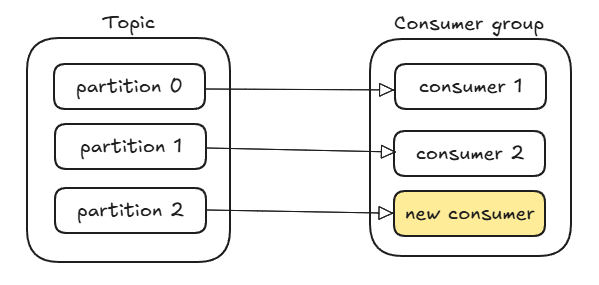
Step 2: Canary-style deployment
At this stage, both old and new consumers are processing messages in parallel. If the new consumer behaves unexpectedly, simply terminate it. Kafka will automatically rebalance and reassign its partition to another active consumer. If the new consumer proves stable, you can gradually scale by adding more new consumers and retiring old ones—Kafka will redistribute partitions accordingly.
Final Thoughts
Kafka’s dynamic partitioning and consumer group features enable zero-downtime consumer migrations. This approach allows you to:
- Safely deploy new consumers with minimal risk
- Instantly roll back changes
- Maintain offset continuity, avoiding duplicate or missing messages
A final design tip: use descriptive and consistent naming for consumer groups so that new consumers can join naturally without creating confusion or fragmentation.

 Tenzin kabsang