
How do you make the selected tab standout in an ASP.NET Mvc Project? This is a fairly common task for every sort of web project, we usually do this to help the user keep track of where they are. But unfortunately this functionality is not built-in and you have to do some manual labor to make it all work. Here is one of the technique that you can use to implement this, which also works with AREAs. Here is the end product:
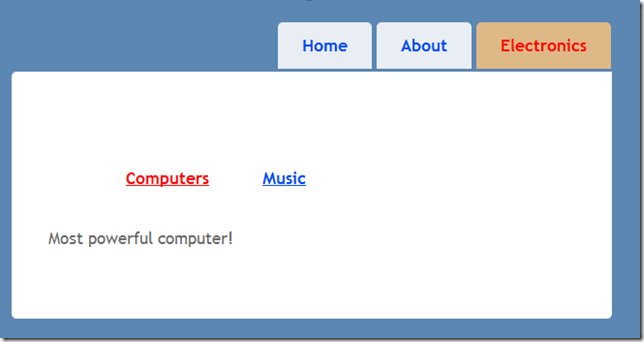
So basically Electronics is an area which consists of two controllers in my case. The selected menu and any sub-menu will be marked as red.
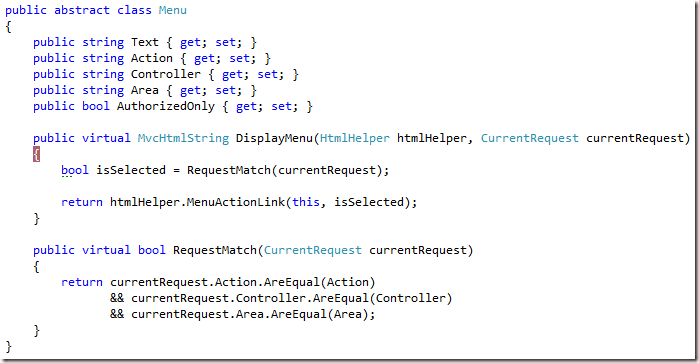
First create a base Menu class that knows how to display itself using the RequestMatch method to determine whether to mark itself as selected based on current request. It then forwards the call to an extension method. This base menu class is sufficient if you only have to deal with one level menus, meaning no sub-menus.
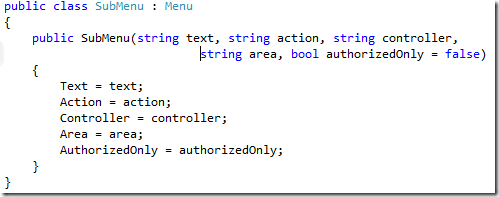
Since the SubMenu is the last node, it can use the base functionality here.
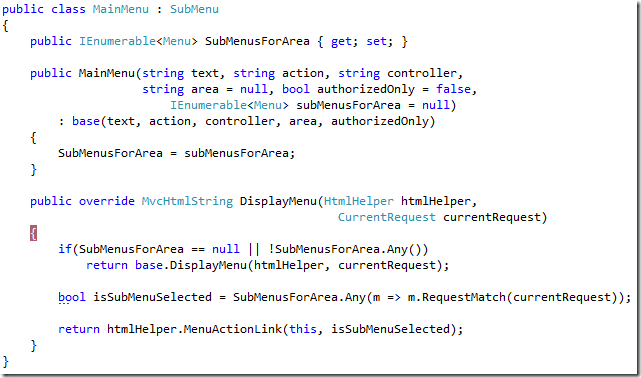
The MainMenu however needs to override the DisplayMenu method because it also has to take into account whether one of its submenu’s is selected or not. If any of its sub-menu is selected than the main-menu must also stay selected. This is the only tricky logic that you have to take into account. Now to make everything work you need to create an HtmlHelper extension method like so:

The Menu extension method is pretty simple, it grabs the “action”, “controller” and ”area” values from routeData and this is what we’ll use to determine which menu to mark as selected using the DisplayMenu method.
If you haven’t already noticed I can also turn individual menus on/off based on whether the current user is authorized or any other constraints you can think off. That logic is placed in the MenuActionLink extension method and you can use the given htmlHelper to expose any values you want for e.g., (htmlHelper.ViewContext.HttpContext); In my case it simply checks for that property. Now change your Layout views to use the Menu extension method:


When creating Main-menu you also have to register any sub-menus that it will have, similar to what I’ve done for the Electronics Main menu. Also notice that I’ve set authorizedOnly parameter to True for the About Main menu, which will turn it off in my implementation.

Cheers!

 Tenzin kabsang
Leave a comment