
First of all I am a true believer in SQL scripts and stored procedures and have spent countless hours honing my skills in those areas. However, every time I start to work on a project I have to put on my DBA hat and think in terms of database schemas, relationships and normalizations. Then if I miss something or need to add a few more columns I have to change the database schema first, before being able to do anything else in my code..
The Entity Framework code-first approach is excellent if like me, you’re also getting tired of that same old routine and simply want to think and modify everything in terms of code and not have to worry about database part, to an extent. If you are simply building the database from scratch it is an easy process to utilize code-first and there are numerous tutorials on the Microsoft website. Here I’ll simply use code first to demonstrate how to use it on an existing database and not have to stick with those ugly database table and column names that some company like to use….
So lets use this following database schema for the demo.

Now lets create our model to match this schema.
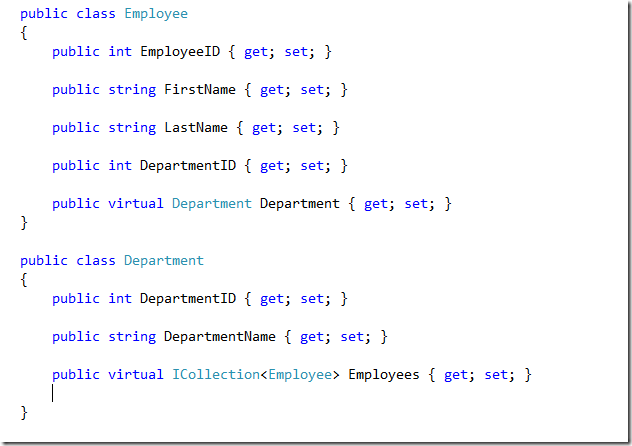
As you’ll notice that the class and property names does not match the ugly database table and column names, entity framework will still be able to communicate with the database and I’ll show you how shortly.
And of course you can still add all the Data Annotation filters to your hearts content…
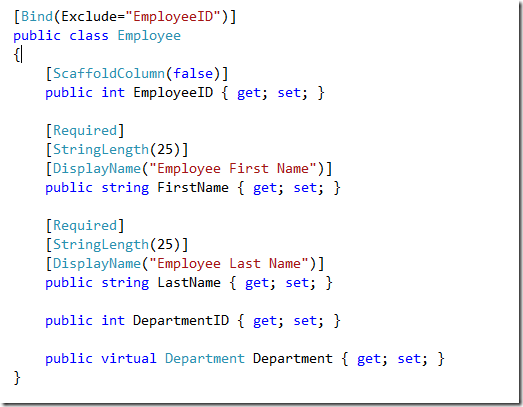
Now lets get to the main content of the blog and that is – Make my classes work with the database tables, and to do that you simply override “onModelCreating” in your DataContext class like so…

So basically you’re telling modelBuilder that you have a class name Employee – match it to the table name abc_Employee, and same goes for the column names as well.
So here you have it, Entity Framework code-first approach communicating with a database table that has different names than your classes. It is really a simple process using this approach. Have fun! 

 Tenzin kabsang
Leave a comment